usbip-server
GUD Display
A 320x240 RGB565 display speaking the GUD (Generic USB Display)
protocol. Linux binds its gud driver to it and it becomes a real monitor: the desktop
can extend onto it, and the device shows what the host draws in a window.
| Program | out/usb_gud_display_device, built with make gud_display |
| Source | src/usb_gud_display/ |
| USB id | 1d50:614d, the original GUD id |
| Interface | class 0xff (vendor specific) |
| Endpoint | 0x01 bulk OUT for pixel data, 512 byte packets |
| Requires | SDL3 to build (sudo apt install libsdl3-dev), the gud kernel module (Linux 5.13 or later) |
The gud driver only binds to a few fixed vendor and product ids, so the display can
not use the fa00 vendor id of the other examples.
To use the display as a framebuffer, drawn on by modetest, ffmpeg, the tools in
tools/ or your own programs, install the udev rule
udev/71-gud-mutter-ignore.rules first, see GNOME
below. Without it GNOME takes the display over as a desktop monitor, and other programs
can not show anything on it.
Try It
The display is not part of make, since its window needs SDL3:
$ make gud_display
$ out/usb_gud_display_device &
$ sudo usbip attach -r localhost -b 1-1
A window titled “Virtual GUD Display” shows the display, twice the size. On a desktop like GNOME the display shows up as a new monitor in the display settings about 10 seconds after the attach, and the desktop extends onto it.
Without the desktop, for example with the udev rule below installed, draw a test pattern
with modetest (sudo apt install libdrm-tests):
$ modetest -M gud -c                            # find the connector id, for example 38
$ modetest -M gud -s 38:320x240@RG16            # colour bars until Enter is pressed
$ modetest -M gud -s 38:320x240@RG16 -F tiles,tiles
Other fill patterns are smpte, gradient, plain and noise.
Drawing on the Display
Without the desktop, programs can also draw through the display’s framebuffer device,
/dev/fbN. It belongs to the video group, add yourself with
sudo usermod -aG video $USER and log in again.
The kernel only shows the framebuffer once its mode has been set, so switch it on after each attach with tools/fb_activate.py. It finds the GUD display’s framebuffer by itself:
$ uv run tools/fb_activate.py
/dev/fb1: 320x240, 16 bits per pixel, switched on
Then ffmpeg can draw on it, here a moving test pattern and a fractal zoom. Use the
framebuffer the tool printed, and rgb565le for the display’s RGB565 format:
$ ffmpeg -re -f lavfi -i testsrc2=size=320x240:rate=15 -pix_fmt rgb565le -f fbdev /dev/fb1
$ ffmpeg -re -f lavfi -i mandelbrot=size=320x240:rate=15 -pix_fmt rgb565le -f fbdev /dev/fb1
tools/fb_animation.py switches the framebuffer on itself and draws animated demo effects, a plasma, a tunnel flight and fire, in turn until Ctrl-C:
$ uv run tools/fb_animation.py
$ uv run tools/fb_animation.py --effect tunnel --fps 20
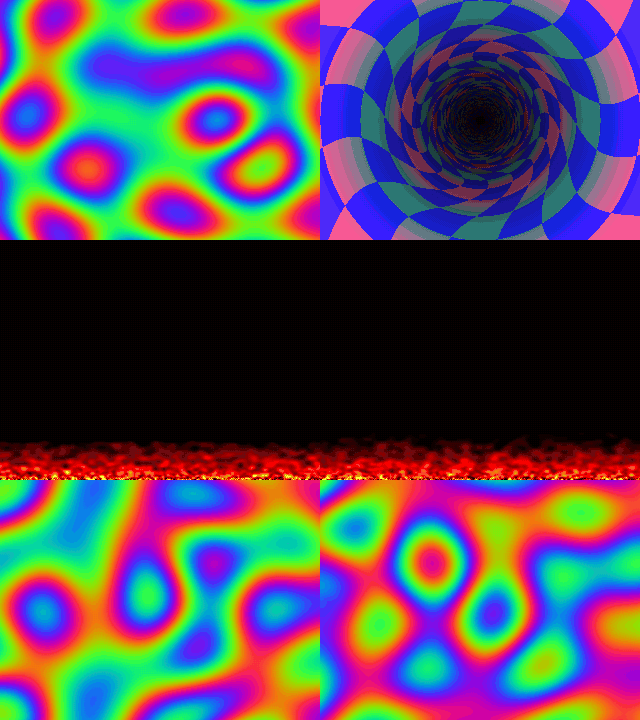
The framebuffer only shows while no other program, like modetest or the desktop,
drives the display.
GNOME
On GNOME, attaching the display again after it was detached can make GNOME Shell crash or ignore the display: mutter never forgets a display that was unplugged. Stopping the device detaches it too.
Two ways to work with this:
- Use it as a desktop monitor: attach the display once per session. After a detach, log out and in before attaching it again.
-
Keep GNOME away from it: install the udev rule in udev/71-gud-mutter-ignore.rules before the display is attached for the first time in a session. The desktop then never uses the display, it can be attached and detached freely, and
modetestor your own program can draw on it:$ sudo install -m 644 udev/71-gud-mutter-ignore.rules /etc/udev/rules.d/ $ sudo udevadm control --reload-rules
These are GNOME issues, see mutter#4617, mutter#4963 and mutter#710.
What You See
USB GUD Display Device Activated
USBIPServer: Connected
USBIPProtocol: USBIP_CMD_REQ_DEV_IMPORT '1-1'
Display: controller enabled
Display: 320x240, format 0x40
Display: output enabled
Display: 3 updates, 153600 bytes, last 320x36 at 0,204, 0 errors
controllerandoutputfollow the host switching the display on and off.320x240, format 0x40is the mode the host set,0x40is RGB565.- Screen updates are summed up once a second. A full frame is 153600 bytes, which the host splits into transfers of at most 64 KiB, the buffer size the display announces.
How It Works
- The control callback answers the GUD requests in usb_gud_display_device.c: the display descriptor, pixel formats, rotation property, connector, its status and display mode. The protocol definitions are in gud_protocol.h.
- Control OUT requests can not be rejected through the library, so the display sets
GUD_DISPLAY_FLAG_STATUS_ON_SET: the host reads the result of each one withGUD_REQ_GET_STATUS. - Before each bulk transfer the host sends
GUD_REQ_SET_BUFFERwith the rectangle the transfer updates. The pixels are copied into a framebuffer, which the main loop converts and shows in the window. - The connector is reported as disconnected for the first 5 seconds after attaching and connected after that. The host polls the connector status every 10 seconds, sees the change and tells the desktop, which only picks up a display’s connector when it changes.
- The window code is in gud_display_window.c, the only file that uses SDL3.
Prototyping
Resolution, pixel formats, buffer size and compression are set at the top of
usb_gud_display_descriptors.h.
The window can show every format of 8 bits per pixel or more. LZ4 compression is not
implemented yet; the place to decompress is marked in endpoint_data().
Troubleshooting
- The window stays black: the desktop is not using the display. Wait about 10 seconds
after the attach, and check whether the udev rule is installed. Without the desktop,
draw on the display with
modetest. - GNOME logs
Failed to hotplug secondary gpu '/dev/dri/cardN': device already present: the display was attached again in the same session, see GNOME above. make gud_displaystops with “The GUD display needs SDL3”: installlibsdl3-dev.